# Rental Vehicle
**Navigate to the Rental Vehicles module for creating Rental Vehicle**
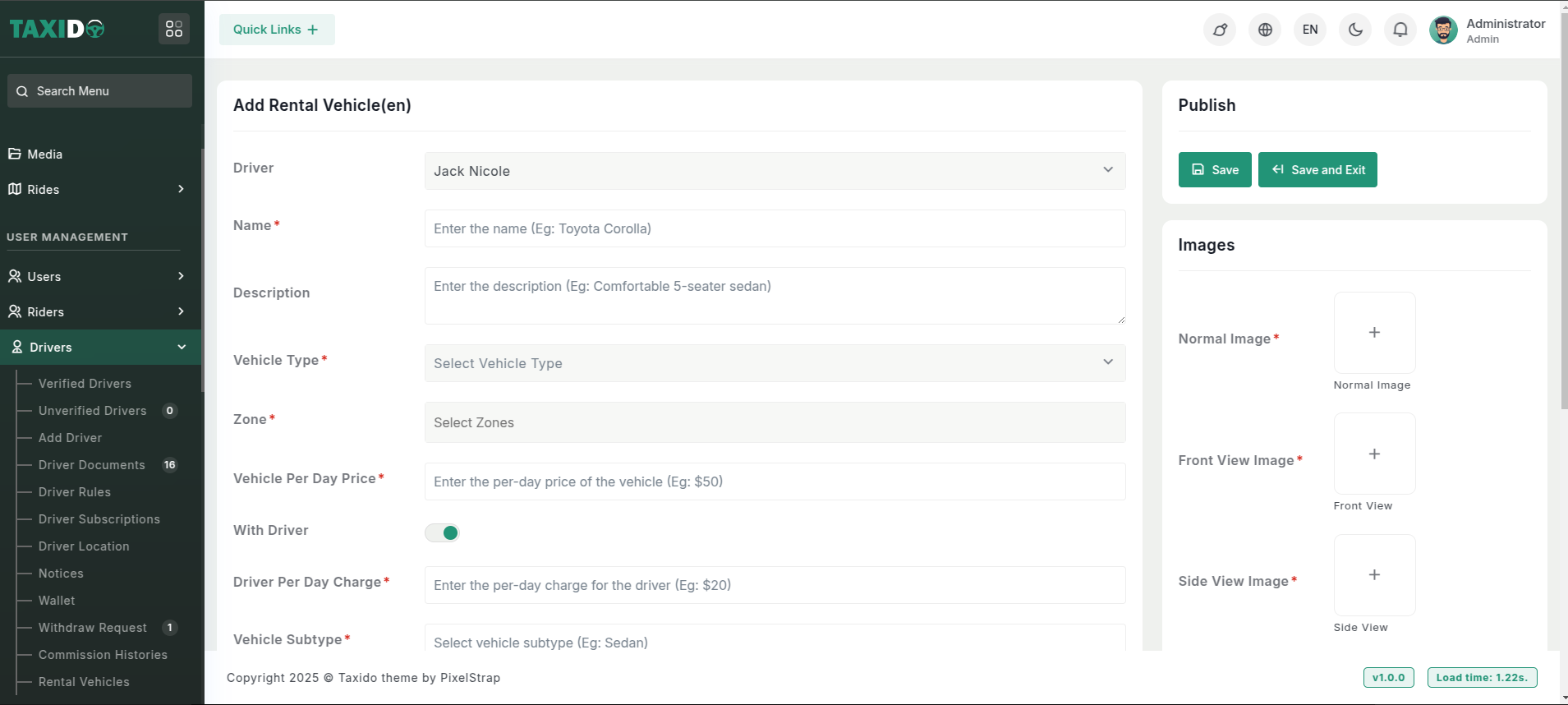
On the admin sidebar, find and click on the Rental Vehicles option available under "Drivers".
Click the Add New button to add a new rental vehicle.
**Fill in the required details for the Ride Zone:**
Driver: Select the driver who will operate this rental vehicle.
Name: Enter the name of this rental vehicle.
Description: Provide a description of this rental vehicle (e.g., "Comfortable 5-seater sedan").
Vehicle Type: Choose the type of vehicle (e.g., bike, car) for this rental vehicle.
Zone: Select the zone for this rental vehicle. The available zones are determined based on the vehicle type.
Vehicle Per Day Price: Specify the daily rental price for this vehicle.
With Driver: Toggle to enable or disable the option to rent the vehicle with a driver. If enabled, the vehicle will be available for rent with a driver, and you must specify the driver's daily charge. If disabled, the vehicle will only be available for rent without a driver.
Driver Per Day Charge: Specify the daily charge for the driver when the "With Driver" option is enabled.
Vehicle Subtype: Specify the subtype of this rental vehicle.
Fuel Type:Indicate the fuel type used by this rental vehicle.
Gear Type: Specify the gear type of the vehicle (e.g., automatic, manual).
Vehicle Speed: Provide the maximum speed of the vehicle.
Mileage: Enter the mileage of the vehicle (e.g., kilometers per liter).
Registration No: Provide the registration number of the vehicle.
Status: Enable or disable the vehicle. If enabled, this vehicle are available for the rent; if disabled, it is not available.
Interior: Describe the interior features of the vehicle (e.g., leather seats, air conditioning).
Images:
1. Normal Image: Upload a standard image of the vehicle showing its overall appearance.
2. Front View Image: Upload an image of the vehicle’s front view.
3. Side View Image: Upload an image of the vehicle’s side View.
4. Boot View Image: Upload an image showcasing the boot space of the vehicle.
5. Interior: Upload an image displaying the interior of the vehicle.
6. Registration Image: Upload an image of the vehicle’s registration document for verification purposes