# SMS Gateways

#### **How to setup SMS gateways?**

**Alphanet SMS Gateway**

**Step 1: Register on Alphanet:**

1. Go to [Alphanet's website](https://alphasms.net/panel/sign-up/) and sign up.
2. Complete the registration process with your details.

<figure><img src="https://74030740-files.gitbook.io/~/files/v0/b/gitbook-x-prod.appspot.com/o/spaces%2F6o4UzjBZtMQpeq4oeh8s%2Fuploads%2FkfEwirWnWXgqzhwTT4cZ%2Falpha_sms.png?alt=media&#x26;token=408b0879-30ab-46de-afe5-4b4fbc2ac7a1" alt=""><figcaption></figcaption></figure>

**Step 2: Access the API Credentials:**

* Navigate to the "API Settings" section and generate your API Key and Secret.

<figure><img src="https://74030740-files.gitbook.io/~/files/v0/b/gitbook-x-prod.appspot.com/o/spaces%2F6o4UzjBZtMQpeq4oeh8s%2Fuploads%2FkAhOjDHR4JhklXqhidmZ%2Falphanet1.png?alt=media&#x26;token=187bfe40-d2e6-4c65-b6b1-a4713841664c" alt=""><figcaption></figcaption></figure>

<figure><img src="https://74030740-files.gitbook.io/~/files/v0/b/gitbook-x-prod.appspot.com/o/spaces%2F6o4UzjBZtMQpeq4oeh8s%2Fuploads%2FdahvFDddiS0Q9nx7giGz%2Falphanet2.png?alt=media&#x26;token=e158698d-a06a-435d-b93e-fa9eccc202e8" alt=""><figcaption></figcaption></figure>

<figure><img src="https://74030740-files.gitbook.io/~/files/v0/b/gitbook-x-prod.appspot.com/o/spaces%2F6o4UzjBZtMQpeq4oeh8s%2Fuploads%2FTJPHzWgIuoI2QNDX10tA%2Falphanet3.png?alt=media&#x26;token=972d58d3-cc1b-4e78-ae4b-b3d2fa10318e" alt=""><figcaption></figcaption></figure>

**Msg91 SMS Gateway**

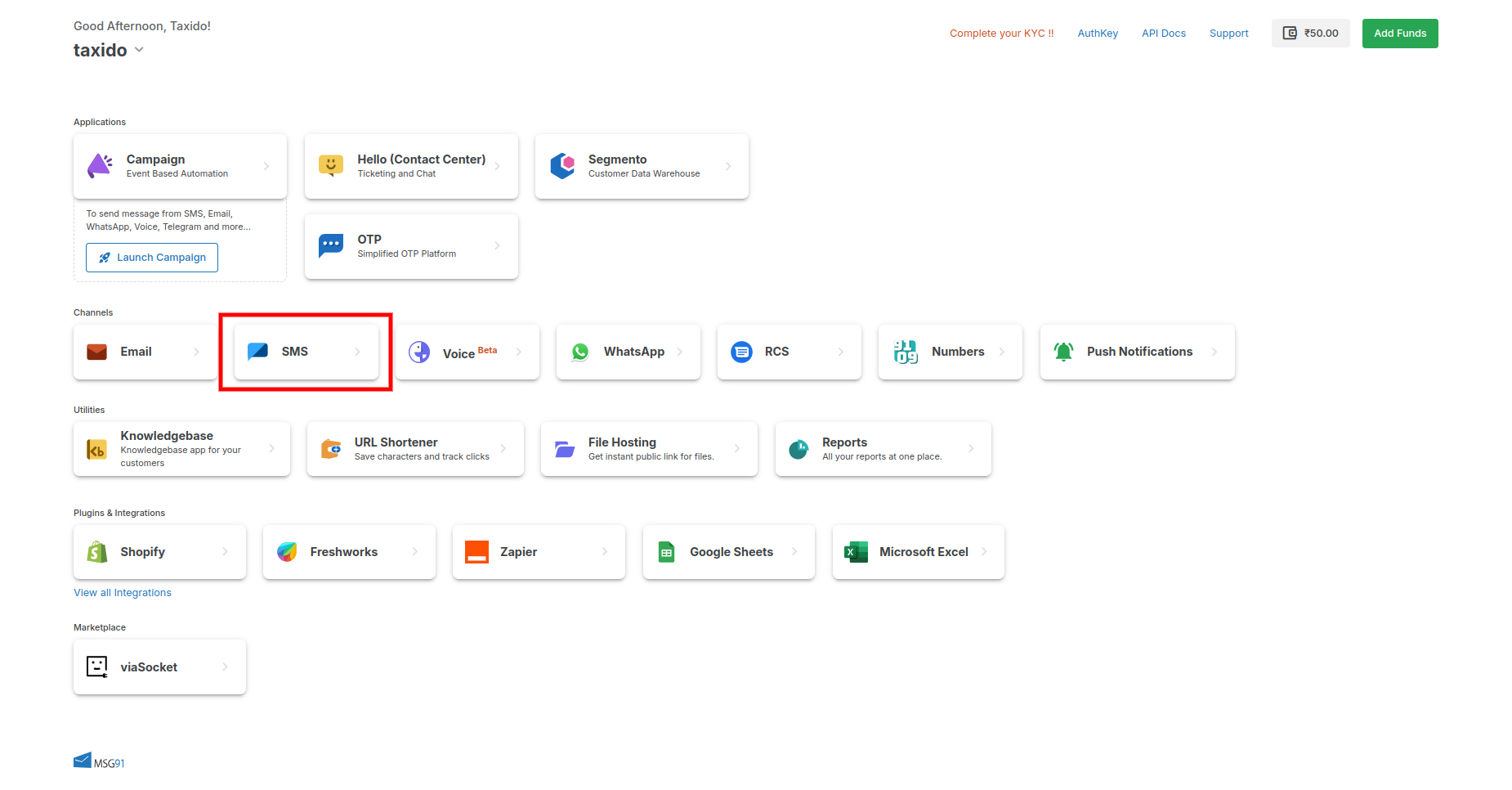
**Create a Msg91 Account:**

* Go to [Msg91's website](https://msg91.com/signup) and sign up.
* Complete the registration process with your details.

<figure><img src="https://74030740-files.gitbook.io/~/files/v0/b/gitbook-x-prod.appspot.com/o/spaces%2F6o4UzjBZtMQpeq4oeh8s%2Fuploads%2FwqTlQ5DD5tCAcLYj8dXI%2Fmsg911.png?alt=media&#x26;token=18f4d2ef-fb60-4996-a20a-5e63904e4631" alt=""><figcaption></figcaption></figure>

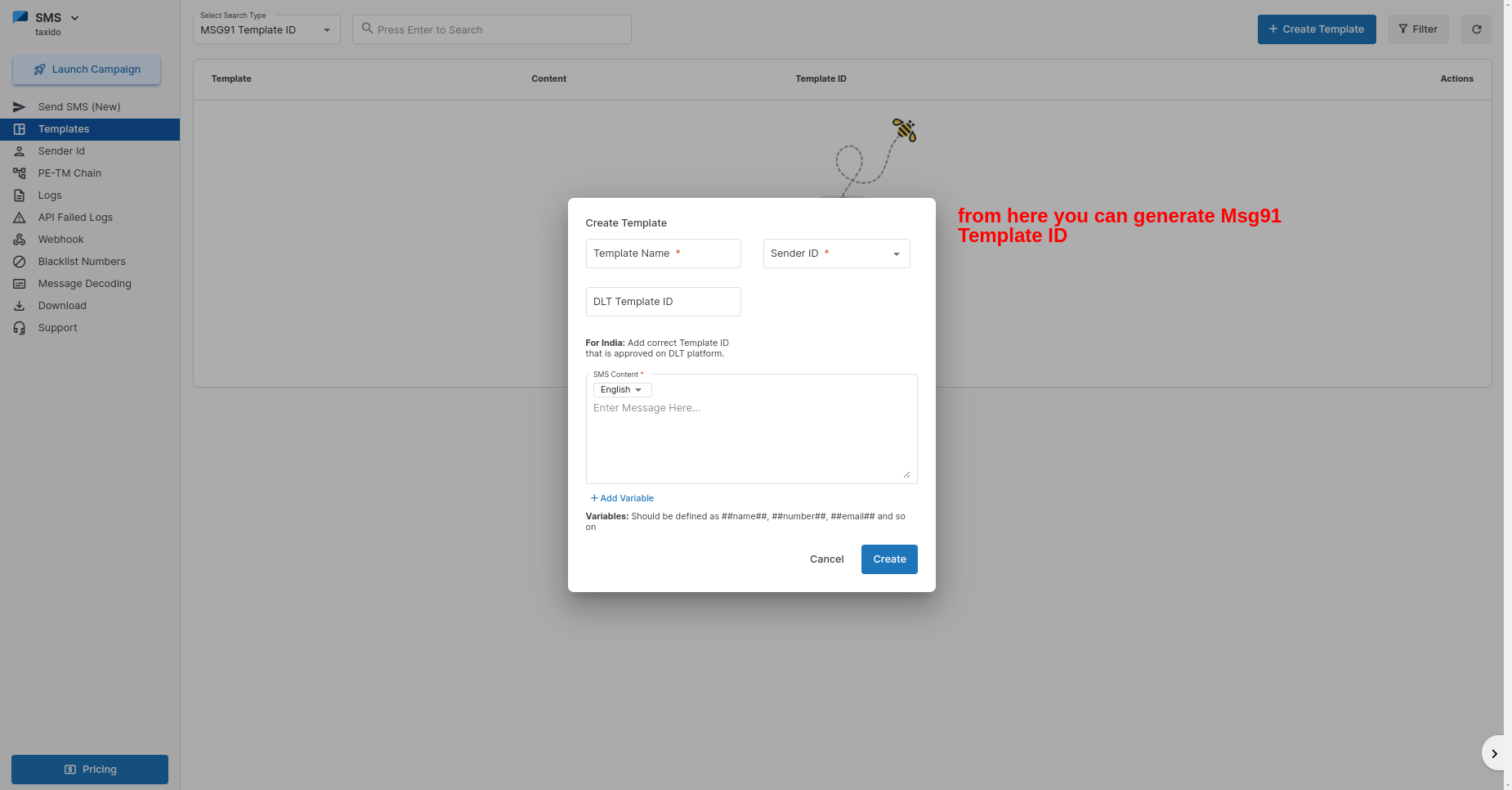
* Navigate to the "Sms" section and generate your API Key and Template ID.

<figure><img src="https://docs.pixelstrap.net/laravel/taxido/assets/images/setting-management/msg914.png" alt=""><figcaption></figcaption></figure>

**Step 2: Access the API Credentials:**

<figure><img src="https://docs.pixelstrap.net/laravel/taxido/assets/images/setting-management/msg912.png" alt=""><figcaption></figcaption></figure>

<figure><img src="https://74030740-files.gitbook.io/~/files/v0/b/gitbook-x-prod.appspot.com/o/spaces%2F6o4UzjBZtMQpeq4oeh8s%2Fuploads%2FQPWe6GjxxGubYlD4ISoU%2Falphanet2%20(1).png?alt=media&#x26;token=ca25528d-f516-4edd-90d2-5b73754770e8" alt=""><figcaption></figcaption></figure>

**Nexmo SMS Gateway**

**Create a Nexmo Account:**

1. Go to [Nexmo's website](https://ui.idp.vonage.com/ui/auth/registration) and sign up.
2. Complete the registration process with your details.

**TwoFactor SMS Gateway**

**Create a TwoFactor Account:**

1. Go to [TwoFactor's website](https://2factor.in/v3/signup/) and sign up.
2. Complete the registration process with your details.

<figure><img src="https://74030740-files.gitbook.io/~/files/v0/b/gitbook-x-prod.appspot.com/o/spaces%2F6o4UzjBZtMQpeq4oeh8s%2Fuploads%2FNiJ9jjXXbEFcDSz9BZAx%2Ftwofactor1%20(1).png?alt=media&#x26;token=e6f941d0-27c9-4f4c-add4-2c7ccf5d3a21" alt=""><figcaption></figcaption></figure>

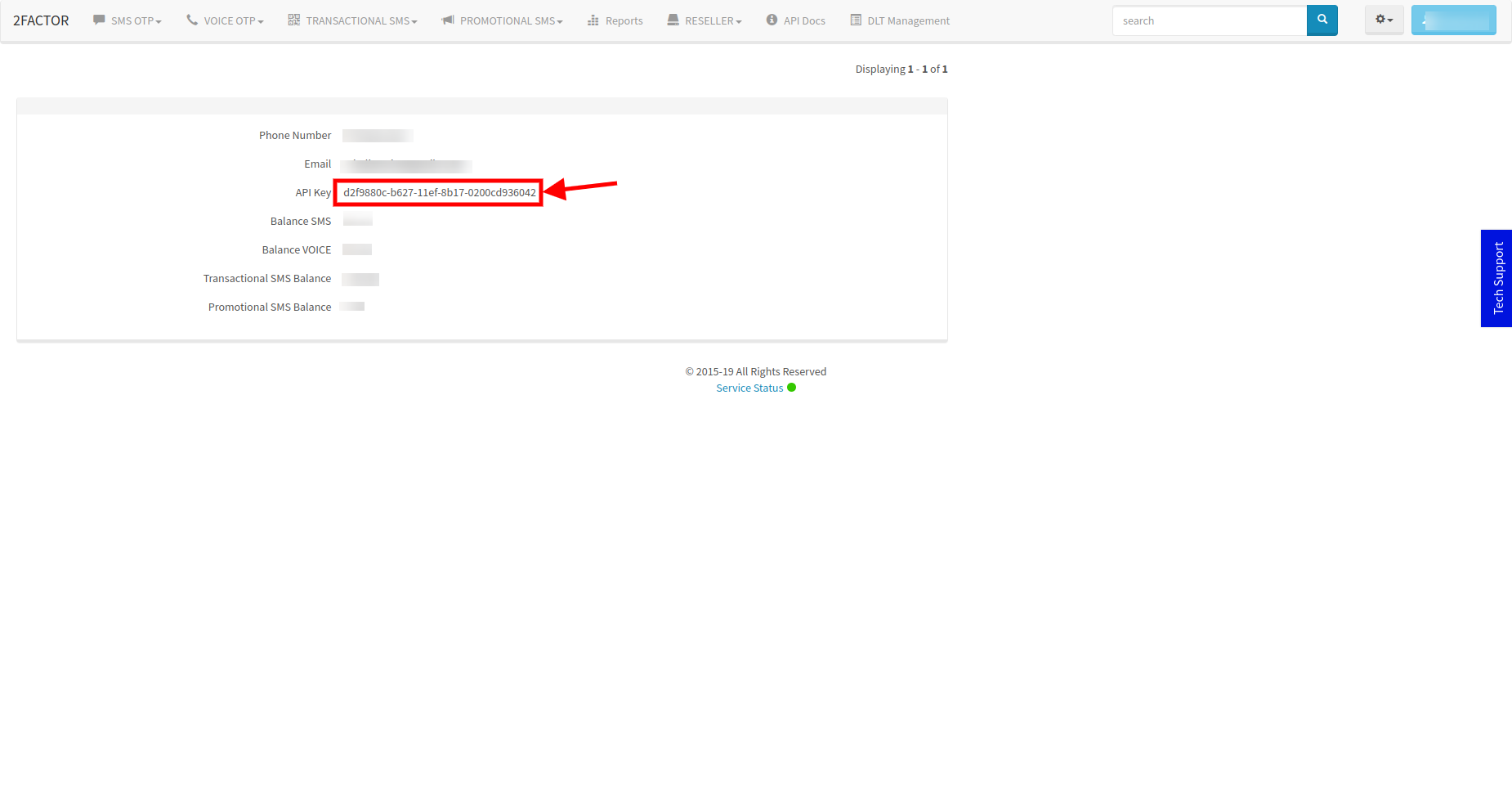
* Navigate to the "Account Summary" section and get your API Key

<figure><img src="https://74030740-files.gitbook.io/~/files/v0/b/gitbook-x-prod.appspot.com/o/spaces%2F6o4UzjBZtMQpeq4oeh8s%2Fuploads%2FRRNzmbQ1qyQWCPehkNOc%2Fimage.png?alt=media&#x26;token=4c0be7c9-5f89-48ed-8ca5-e3b6844faa13" alt=""><figcaption></figcaption></figure>

**Step 2: Access the API Credentials:**

<figure><img src="https://docs.pixelstrap.net/laravel/taxido/assets/images/setting-management/twofactor3.png" alt=""><figcaption></figcaption></figure>

**Twilio SMS Gateway**

**Create a Twilio Account:**

1. Go to [Twilio's website](https://docs.pixelstrap.net/laravel/taxido/hKFo2SBCWm9EeUdIMmM0V3VWS0pGbDhidFk1cGIyY1ZIbm5zeaFur3VuaXZlcnNhbC1sb2dpbqN0aWTZIEt5V0prNDBodjExMU1FWVhMSmtTeGNSYWp2dUt3X05Io2NpZNkgTW05M1lTTDVSclpmNzdobUlKZFI3QktZYjZPOXV1cks) and sign up.
2. Complete the registration process with your details.

<figure><img src="https://74030740-files.gitbook.io/~/files/v0/b/gitbook-x-prod.appspot.com/o/spaces%2F6o4UzjBZtMQpeq4oeh8s%2Fuploads%2FsKr4wAGs7K5CaftTkFoQ%2Fimage.png?alt=media&#x26;token=3bcf702b-f97f-4588-88d7-80d185a7fb12" alt=""><figcaption></figcaption></figure>

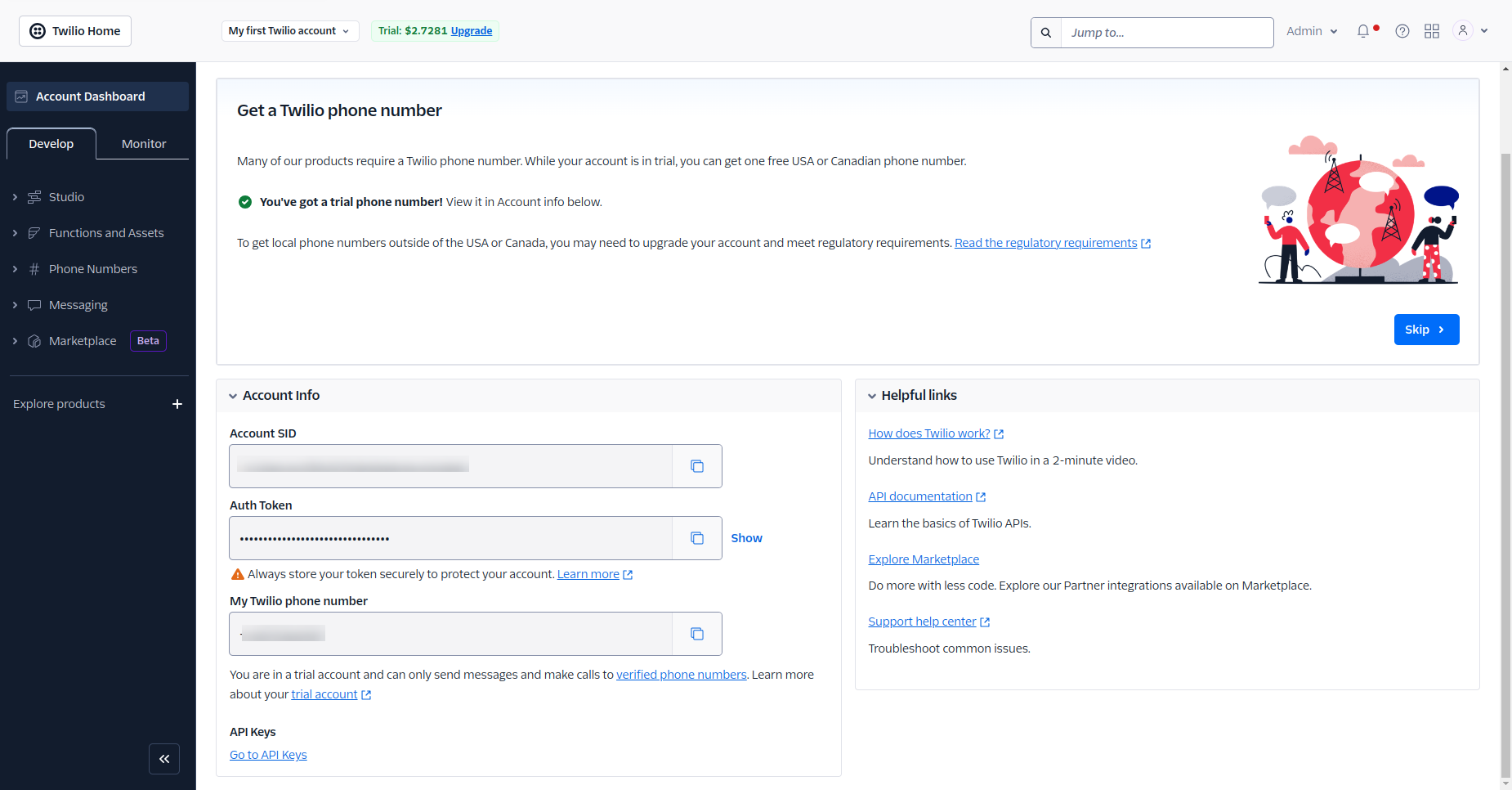
1. Navigate to the "Dashboard" section and Access your API Key

**Step 2: Access the API Credentials:**

<figure><img src="https://docs.pixelstrap.net/laravel/taxido/assets/images/setting-management/twilio2.png" alt=""><figcaption></figcaption></figure>