# User App

{% hint style="info" %} <i class="fa-bullhorn">:bullhorn:</i> NOTE :\
Before launching the app, ensure you have correctly set up the ADMIN LARAVEL and have added all necessary data through the admin panel.
{% endhint %}

## **Create a Project :**

1. **Open terminal and change location to where you want to create project.**<br>

   <figure><img src="https://74030740-files.gitbook.io/~/files/v0/b/gitbook-x-prod.appspot.com/o/spaces%2F6o4UzjBZtMQpeq4oeh8s%2Fuploads%2FnNXPn7OlWrfBjU4485lD%2Fss7.png?alt=media&#x26;token=4fc321a1-508d-414c-9e93-63488e3c0417" alt=""><figcaption><p><br></p></figcaption></figure>
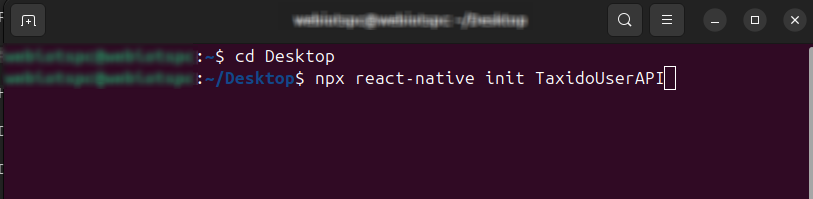
2. **To create a React Native project, run the following command :**<br>

   ```html
   npx react-native init TaxidoUserAPI
   ```

   <br>

   <figure><img src="https://74030740-files.gitbook.io/~/files/v0/b/gitbook-x-prod.appspot.com/o/spaces%2F6o4UzjBZtMQpeq4oeh8s%2Fuploads%2Fo6DLTUPo3XblJ9UjTzFg%2Fss8.png?alt=media&#x26;token=8f0ccaa0-ddfd-4350-ab2b-1fef094634e6" alt=""><figcaption><p><br></p></figcaption></figure>
3. **If you want to create a project with a specific React Native version, use the command :**<br>

   ```html
   npx @react-native-community/cli init TaxidoUserAPI --version 0.82.1
   ```

   <figure><img src="https://74030740-files.gitbook.io/~/files/v0/b/gitbook-x-prod.appspot.com/o/spaces%2F6o4UzjBZtMQpeq4oeh8s%2Fuploads%2FpBL8hlH7rYyh3k7bUiL6%2Fimage.png?alt=media&#x26;token=5d2fe3d8-bcb2-46b3-ab39-8922803e120b" alt=""><figcaption></figcaption></figure>