# Category List

## ![](https://docs.pixelstrap.net/laravel/taxido/assets/images/icons/dart.png) **Create & Categories List**

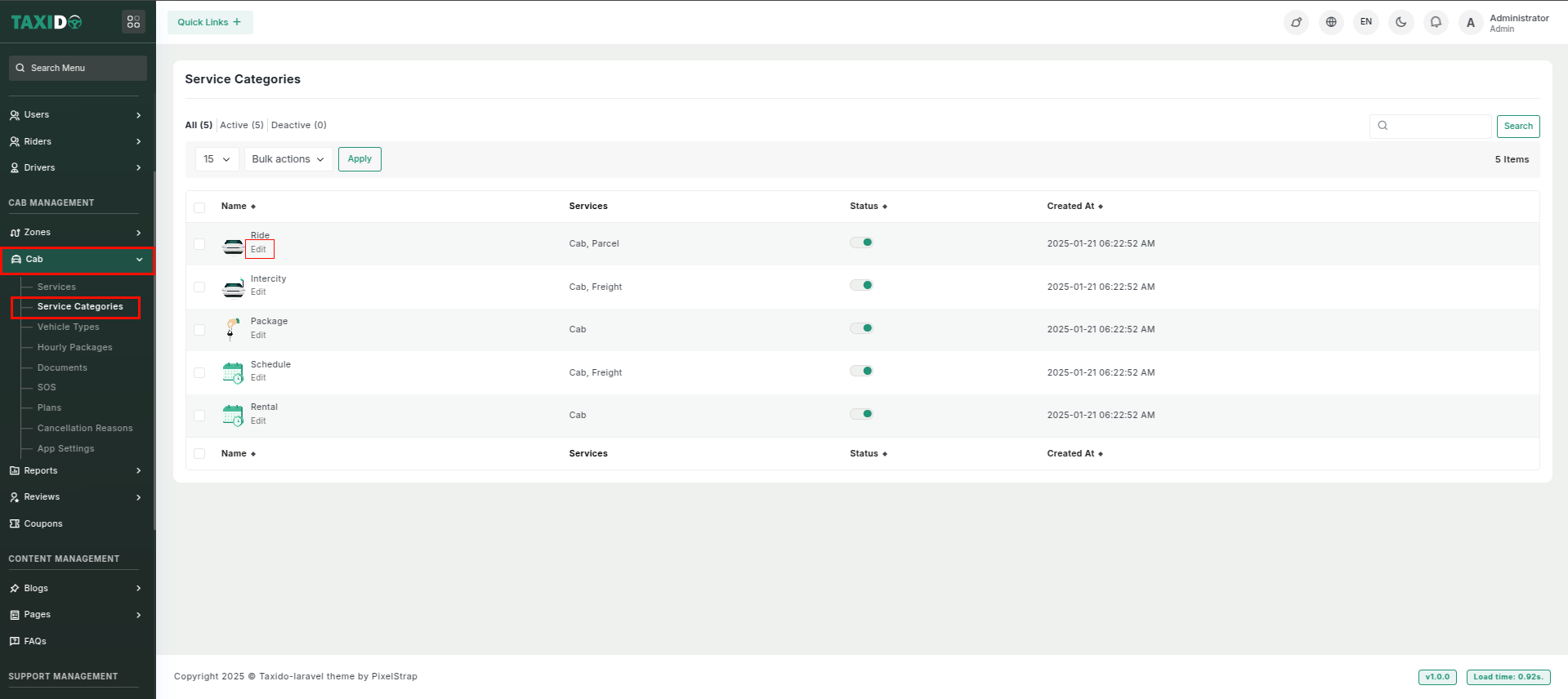
1. Go to your admin panel in Laravel, and on the left-hand side menu, click on **"Cab**" then **"Services** Categories", where you will find options like **Ride, Intercity, Package, Rental, Schedule and Ambulance**. To edit a service category, click on Edit, where you can update details like **Language, Name, Image, Description, and manage services like Cab and Parcel.**<br>

   <figure><img src="https://docs.pixelstrap.net/laravel/taxido/assets/app/screenshot/serviceCategory1.png" alt=""><figcaption><p><br></p></figcaption></figure>

   <figure><img src="https://docs.pixelstrap.net/laravel/taxido/assets/app/screenshot/package3.png" alt=""><figcaption></figcaption></figure>
2. For the App\
   \
   ![](https://74030740-files.gitbook.io/~/files/v0/b/gitbook-x-prod.appspot.com/o/spaces%2F6o4UzjBZtMQpeq4oeh8s%2Fuploads%2Fy1p6RS2SdwhSrsdkpg96%2Fimage.png?alt=media\&token=67ba014d-e190-4cc5-8963-dfb570b57221)<br>